
✦ LOVEYDEAR INVITATION STUDIO
Event invitation
For meetings, workshops, conferences, openings and company parties: programme, venue, registration form and participant list in one link.
Annual Partner Meetup18 March 2027

Create with confidence
- Create for free, then decide
You create your page and see it in the preview before you pay anything. You only pay when you publish.
- Secure payment
Through the licensed payment provider PayTR with 3D Secure; your card details never reach us.
- Only through your link
Your page is only visible to people you send the link to, and it isn't added to search engines.
- Cancellation and refunds
You'll find all the conditions in our cancellation policy. Cancellation policy
- Your photos and data
How we handle your photos and details is explained in our privacy policy. Privacy
- A real business
LoveyDear is run by a registered sole trader; I answer your questions personally by email or WhatsApp. Imprint · About us
Digital event invitation
What is a digital event invitation?
A digital event invitation is an invitation page you send as a link – for a company party, a team meeting, a workshop, a conference or an opening. Guests open an envelope with your logo, see the programme, venue and time, and register right inside the invitation.
Because it’s a link, you reach everyone through WhatsApp, email, Slack or Teams. If the room or the time changes, you edit the invitation – the link stays the same.
Which events is it for?
You choose the type of event in the form, and it sets the heading on the envelope – for example “Opening invitation” or “Celebration invitation”.
- Company party, summer party and Christmas party
- Team meeting and staff meeting
- Workshop, seminar and talk
- Conference and networking evening
- Webinar and online event – with a link instead of an address
- Opening and open day
- Product launch
How to create the invitation
The form above takes you through five steps; leave out anything you don’t need.
- Eventname, organisation, type of event and your invitation text.
- When and wheredate, time and time zone, a venue with a map or an online link.
- Logo, colours and musicyour logo in the envelope’s seal, photos and a colour theme.
- Programme and contentagenda items, speakers, FAQs and a contact.
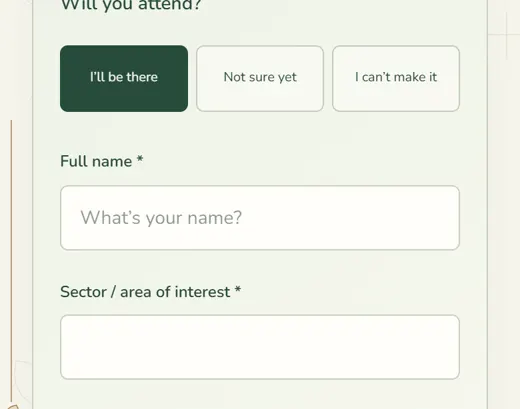
- Registrationwhat you ask for, capacity and a registration deadline – then you see the preview.
What the invitation can do
Everything here is included – there is only one package.
- Logo and coloursyour logo in the envelope’s seal and a colour theme that suits your brand.
- Registration formattendance, how people take part (in person or online) and the details you need.
- Capacity and deadlineonce all places are taken or the deadline has passed, the form stops accepting registrations.
- Participant listall replies on your editing screen, downloadable as an Excel file.
- Programmeagenda items with times, speakers with a photo and a short bio.
- Venue or online linka map with directions in Google Maps and Apple Maps – or the link to your online session.
- Calendarcountdown and add-to-calendar for Google, Apple and Outlook – in your venue’s time zone.
- Introductions boardparticipants introduce themselves with a note, a photo, a short video or a Drive link.
- Shared albuma link to Google Photos or Drive for the event photos.
- Multilingualthe invitation in English, German and Turkish; participants choose the language at the top of the page.
An invitation with registration and a participant list
Every registration arrives by email and appears in the participant list. You can filter by yes, maybe and no and download the list as an Excel file – handy for name badges, catering and room planning.
Only someone with the editing link can see the participant list – it never appears on the invitation page.
Invitation wording for a Christmas party, opening or meeting
Event invitation wording names the occasion, date, venue and registration deadline in a few sentences. Three examples to copy:
- Christmas party: “Dear team, it’s been a year of hard work and great results – now it’s time to celebrate! You’re warmly invited to our Christmas party. Please register by 1 December.”
- Opening: “We’re opening our doors and would love to share the moment with you. Join us for the opening, with music, nibbles and good conversation.”
- Meeting or workshop: “You’re warmly invited to our workshop. The programme, the venue and the registration are all in this invitation.”
Sending it: WhatsApp, email, Teams
Once it’s published, you have one link. In WhatsApp and many other apps it shows a preview with the title, date and venue; in emails, Slack or Teams you simply paste it in.
The invitation stays online for one year from publishing. During that time you can change the programme, room or time whenever you like; anyone who already has the link sees the new version.
Frequently asked questions
How much does a digital event invitation cost?
- €79 as a one-time payment, with no subscription. Designing and previewing is free.
How long does the invitation stay online?
- One year from publishing. After that it goes offline.
Does it work for an online event?
- Yes. Instead of an address you add the link to your online session; on the registration form guests choose whether they’ll join in person or online.
Can I limit the number of participants?
- Yes. With a capacity, the form stops accepting registrations once all places are taken; with a deadline, from a fixed time.
Do I need an account?
- No. You only enter an email address; we send your editing link and the registrations there.
Can I offer the invitation in several languages?
- Yes. Add German or Turkish on your editing screen; if you like, AI fills in a draft. Participants choose the language at the top of the page.
Is LoveyDear available in other languages?
- Yes: in English, German and Turkish. This page is also available in German and in Turkish; the Turkish site has its own prices in Turkish lira.