Wedding and engagement
Wedding Invitation with a Voice Message: How It Works
Invite your guests in your own voice: how to record a voice message in your digital wedding invitation, with step-by-step help, example scripts and tips.
In this article · 9 sections
Reading an invitation is lovely – hearing the voices of the people inviting you is something else entirely. A voice invitation is a short message you record in your own voice inside your digital invitation: guests open it, tap ▶ on the “Hear it in our own voices” card, and hear you. Here's how it works, what your guests see and what you might say. Want to try it straight away? Create your digital wedding invitation for free.
What is a voice invitation?
A voice invitation is a recording of up to 60 seconds that sits right inside your wedding or engagement invitation. A printed card only has text, and a WhatsApp voice note gets lost in the chat. This gives you both: every detail of the invitation – the celebrations, the map, the RSVP form – stays in place, and your voice becomes part of it. The card below is the real card from our example invitation; tap ▶ to listen. The example recording is in Turkish – yours, of course, will be in your own language.
Hear it in our own voices.
It's the same card as in the invitation, with the same player. The recording only loads when someone taps, so the invitation doesn't open any slower. While the voice invitation plays, the background music pauses automatically.
Why add your voice?
- Personal: the same words sound like a real invitation when they come from you.
- Easy for grandparents: anyone who struggles with long text can listen with one tap.
- Close for those far away: relatives in another city or abroad get to hear your voice.
- It doesn't get lost: not a voice note that slides up the group chat, but a card that always stays in the same place.
- One link: everyone receives the same invitation – no need to record separate messages.
- Change it any time: don't like the recording? Record it again; guests always hear the latest version.
How to record your voice invitation
- Start your wedding or engagement invitation; names, celebrations and your message come first.
- At the voice step, tap “Record voice invitation” and allow access to your microphone.
- Speak: the timer runs, up to 60 seconds. When you're done, tap “Stop recording”.
- Listen back straight away. Not happy? Tap “Record again” or “Remove recording”.
- Preview your invitation: the card sits right under your message, before the countdown.
- Publish your invitation and send the link to your guests. The voice invitation is included in the Full package.
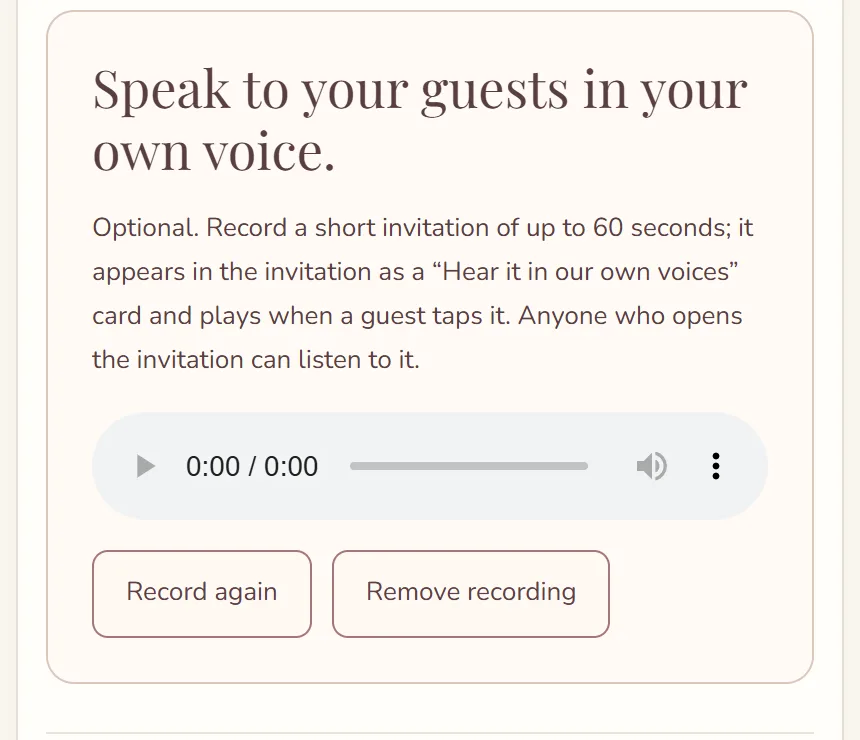
You can change the recording while you create the invitation and after you've published it. If you started with Basic, your recording is kept; once you upgrade to Full, your guests can listen to it.
What do your guests see?
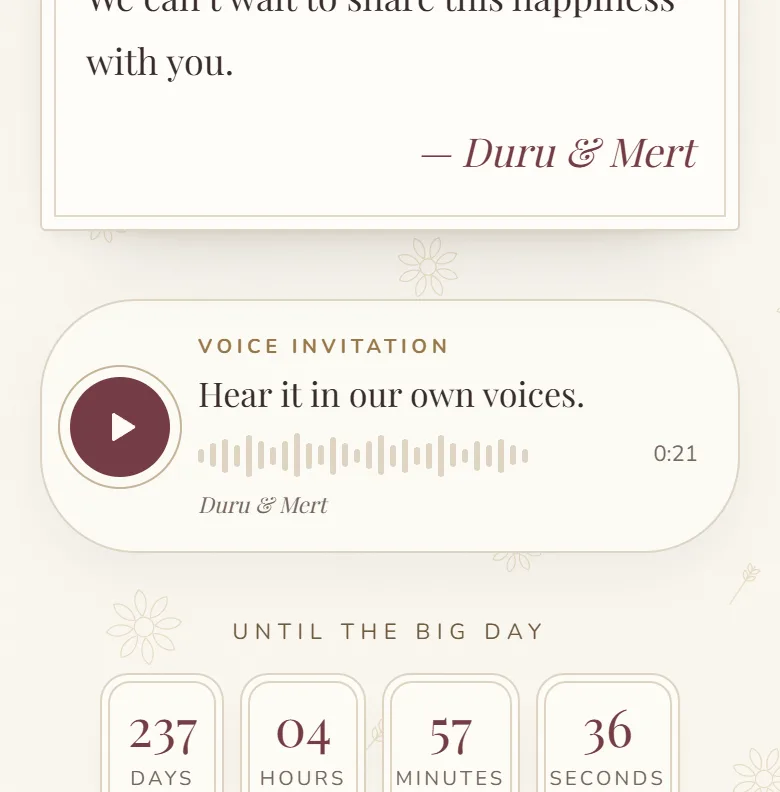
Right below your message, guests see the card: a round play button, a sound wave, the length of the recording and your names. When they tap, the recording starts and the wave fills up. They don't need an app or an account; the invitation opens in their phone's browser.
Voice invitation script examples
You don't need to read out the date and address – they're already in the invitation. The voice message is about why you want these people with you. Examples to adapt with your own names and date:
- Warm: “Hi, it's Emily and James. On the happiest day of our lives, we'd love you to be there with us. All the details are in the invitation – please let us know with the RSVP form. We can't wait to see you!”
- A little more formal: “Dear family and friends, we've decided to spend our lives together. It would mean so much to celebrate this special day with you.”
- On behalf of both families: “The Yılmaz and Demir families would be delighted to welcome you to the wedding of Elif and Emre. Your presence would make us very happy.”
- Engagement: “Hi, it's Defne and Ege – we're engaged! We want the people we love around us on this special evening. The venue and time are in the invitation.”
- For relatives far away: “We know it's a long way. But we wanted you to hear our voices. If you can come, you'll make us so happy – and if you can't, we know you'll be with us in spirit.”
- Short (15 seconds): “Hi! We're getting married and you have to be there. Everything's in the invitation – don't forget to RSVP. See you soon!”
- Funny: “Yes, it's really happening: we're getting married! There's food, music and a dance floor – all we need is you. Please fill in the form, or we'll give your seat away.”
- For grandparents: “Dear Grandma and Grandad, our big day wouldn't be complete without you. Having you there means everything to us.”
- Civil ceremony: “When we say I do at the register office, we want to see your faces. Afterwards we're celebrating over lunch – all the details are in the invitation.”
7 tips for a great recording
- Find a quiet room; carpets and curtains cut down the echo.
- Hold your phone about a hand's width from your mouth, or your breathing will be audible.
- Read your script out loud twice first, then record. No need to learn it by heart.
- Smile while you speak – people can hear it.
- Keep it short: 20 to 40 seconds is ideal. 60 seconds is the limit, not the goal.
- If you're both speaking, take turns rather than talking at the same time.
- Listen once with headphones and once through your phone's speaker – most guests will use the speaker.
Voice invitation or WhatsApp voice note?
- A WhatsApp voice note goes to each person separately or disappears in the group; a voice invitation reaches everyone with one link.
- A voice note has no celebrations, map or RSVP form alongside it; the invitation has them all together.
- You can't change a voice note once it's sent; when you re-record your voice invitation, everyone hears the new one.
Which package includes the voice invitation?
The digital invitation comes in two packages. Basic gives you the whole invitation: envelope, photos, music, every celebration, a map and an RSVP form. Full adds the voice invitation, a personal link for every guest, a guest list with tracking, a memory wall where guests leave photos and messages after the celebration, and a year online. You create your invitation for free first and choose your package after the preview. See every detail on the pricing page.
Frequently asked questions
- How long can the recording be? Up to 60 seconds; most voice invitations last 20 to 40 seconds.
- Do my guests need an app? No. The invitation opens in the browser and the recording plays with one tap.
- Can I change the recording later? Yes. Record it again or remove it in the editor; guests always hear the latest one.
- Does it clash with the music? No. As soon as the voice invitation starts, the invitation's music pauses.
- Is it available for engagement invitations too? Yes, for weddings and engagements.
For more ideas on what to say, see wedding invitation wording and engagement party invitation wording. To collect replies, read what does RSVP mean, and you'll find every feature of the digital invitation on the digital invitation page.
Builds, develops and runs LoveyDear single-handedly.


