
✦ SURPRISE PAGE
Love Story Website
A love story website for one person: your memories on a timeline, your photos, a letter and music — one link you send on WhatsApp.
Sam & EllaFrom the day we met until today
Create it for free, then decide
€9 · one-time, incl. VAT · online for 1 year
You only pay at the end

Create with confidence
- Create for free, then decide
You create your page and see it in the preview before you pay anything. You only pay when you publish.
- Secure payment
Through the licensed payment provider PayTR with 3D Secure; your card details never reach us.
- Only through your link
Your page is only visible to people you send the link to, and it isn't added to search engines.
- Cancellation and refunds
You'll find all the conditions in our cancellation policy. Cancellation policy
- Your photos and data
How we handle your photos and details is explained in our privacy policy. Privacy
- A real business
LoveyDear is run by a registered sole trader; I answer your questions personally by email or WhatsApp. Imprint · About us
About the love story website
What is a love story website?
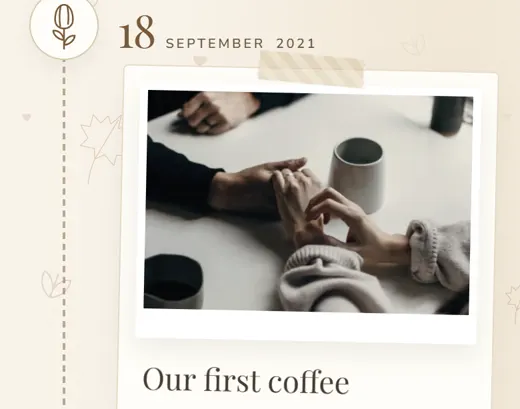
A love story website is a small page that tells the story of the two of you – from the day you met until today – as a timeline of your memories. You send it as a single link: when they tap it, a sealed envelope with their name on it opens first, then your memories follow one after another, each with its date and, if you like, a photo and the place where it happened.
Some people call it a couple website, a relationship timeline or an “our story” page; it is the same idea. What sets it apart from a photo collage or a long message is that it moves as they read: the line of the timeline draws itself, a flower opens at every memory, and between two memories the page writes how much time passed – “13 days later”, “1 year and 3 months later”.
At the end come the days since your first memory, your letter, your photos and your music. It is made for an anniversary, for a long-distance relationship, or for an ordinary Tuesday when you want to say: look how far we've come.
How to make a love story website for your girlfriend or boyfriend
You don't need to code, design anything or sign up. The form above asks one question at a time; skip whatever you don't need.
- Nameswho the page is from and who it is for.
- Your memoriesa title, a date and a few sentences for each – plus, if you like, the place and a photo. One memory is enough to start; you can add up to fifteen.
- Your letter and photoswhat you want to say outside the timeline, and up to 20 pictures of the two of you.
- Envelope, city and musicone of four envelope themes, a drawing of your city and a track from our music library.
- Preview and publishwalk through the page exactly as they will see it. You only pay when you publish.
Not sure which memories to choose? How to tell your love story has a few simple rules that help.
What's on the love story page?
Everything is made for a phone screen and opens straight in the browser:
- A timeline that draws itselfas they read, the line grows and a flower opens at every memory.
- Date by dateif every memory has a date, the page puts them in the right order, whatever order you wrote them in.
- The time in betweenlines like “9 months later” appear by themselves.
- A day counterthe days since your first memory, up to date every time the page opens.
- Photos fresh from the darkroomeach memory's picture turns to colour as they read.
- Places on the mapone tap on a place opens it in Google Maps.
- Your letter and photosyour own words and up to 20 pictures after the timeline.
- Envelope and musicthe page opens from a sealed envelope in one of four themes, with a track from our music library if you like.
- Your citya drawing of your city or country above the timeline.
- Secret notea second message hidden behind a button.
- Lock questionif you like, only someone who knows the answer can open the page.
- Opening datekeep the page closed until a day you choose, with a countdown until then.
- Memory wallfriends and family who open the page can leave notes and photos.
- A card to shareyour story card to download, for example for Instagram.
Love story website ideas: which memories to choose
A good timeline doesn't hold everything; it holds the right moments.
- Three or four strong memories beat ten ordinary ones.
- Give every memory a short title: “The first coffee” says more than a date.
- Write where it happened. A real place they can open on the map makes the memory solid.
- Include a hard stretch too. A story made only of perfect days doesn't feel true.
- For an anniversary: finish with your newest memory and let the letter look ahead to the next year.
- For a long-distance relationship: add the stations, the airports and the days you counted down to.
Looking for words for the letter? See anniversary messages for your partner.
Website builder, coded template or this page: which one fits you?
Search for a love story website and you will find three routes: a general website builder, a template you code and host yourself (GitHub has plenty), or a form like the one above. They suit different people, so here is the honest comparison.
| What matters | A website builder or coded template | This love story page |
|---|---|---|
| What you need | A builder account, or HTML, CSS and JavaScript plus somewhere to host the page | Only the form: no code, no account, no app |
| Time | An evening or more | A few minutes |
| The timeline | You build and order it yourself | Sorted by date, with the time in between written for you |
| Made for | Any kind of website | One person, on their phone: envelope, timeline, letter |
| Changing it later | Log in, or edit the code and upload it again | Edit in the browser for a year; the link stays the same |
| Cost | Depends on the builder and the plan; coding it yourself costs only your time | Free to create and preview; one payment to publish |
So is it a free love story website? Creating and previewing are free here. Publishing costs €9 once – no subscription – and the page stays online for a year. If you want a full site with its own domain, a website builder is the better tool; if you want to send your story as a link tonight, the form is faster.
How to send your love story, and how long it stays online
When you publish, you get one link. Send it on WhatsApp, iMessage or Instagram, or by text; when they tap it, the page opens on their phone. They don't need an app or an account.
You can create and preview without paying: your draft is kept for 7 days and only you can see it. When you publish, you pay €9 once and the page stays online for a year at the same link. The first time it is opened you get an email – so you know your story has arrived.
Would you rather hand it over? After publishing you will find a gift card with a QR code in the editing screen. Print it and slip it in with the flowers or the present; scanning the code opens your page.
Frequently asked questions
Is the love story website free?
- Creating and previewing are free. Publishing costs €9 once, including VAT, with no subscription, and the page stays online for a year.
Do I need to know how to code?
- No. You fill in a form and the page is built for a phone screen. There is nothing to download, host or design.
How many memories can I add?
- Up to fifteen. One is enough to start, but three or four honest memories – the day you met, a first trip, the day you moved in together – already tell a story.
Do I need a date for every memory?
- No. If they all have a date, the page puts them in order and writes the time in between. If one is missing, they stay in the order you wrote them.
Do I need a photo for every memory?
- No. Memories without a photo look just as tidy; add a picture where you have one and leave the rest.
Can I give it as an anniversary gift?
- Yes. Set an opening date and the page stays closed, with a countdown, until your anniversary; you can send the link early. After publishing there is also a printable gift card with a QR code.
Can my partner see the page before I publish it?
- No. Your draft stays private for 7 days and only you see it in the preview. The link only opens once you publish.
Can I still change the page after publishing?
- Yes, as often as you like for a year – add a new memory whenever something happens. The link stays the same and changes show up straight away. Only the names are locked 24 hours after publishing.
Who else can see our love story?
- Only people who have the link. The page does not appear in search engines, and you can add a lock question that only the two of you can answer.
Does my partner need to install an app?
- No. The page opens in the browser, on a phone just as on a computer.
Is LoveyDear available in other languages?
- Yes: in English, German and Turkish. The fixed texts on the page (buttons, labels) appear in the language of the site you create it on; your own words can be in any language. This page is also available in German and in Turkish; the Turkish site has its own prices in Turkish lira.