
✦ SURPRISE PAGE
Anniversary Website
An anniversary website for one person: a live counter since day one, your years, your letter and photos — one link you send on WhatsApp.
To many more years, Sophie— Tom
Create it for free, then decide
€9 · one-time, incl. VAT · online for 1 year
You only pay at the end

Create with confidence
- Create for free, then decide
You create your page and see it in the preview before you pay anything. You only pay when you publish.
- Secure payment
Through the licensed payment provider PayTR with 3D Secure; your card details never reach us.
- Only through your link
Your page is only visible to people you send the link to, and it isn't added to search engines.
- Cancellation and refunds
You'll find all the conditions in our cancellation policy. Cancellation policy
- Your photos and data
How we handle your photos and details is explained in our privacy policy. Privacy
- A real business
LoveyDear is run by a registered sole trader; I answer your questions personally by email or WhatsApp. Imprint · About us
About the anniversary website
What is an anniversary website?
An anniversary website is a small page made for one person – your girlfriend, your boyfriend, your wife or husband – that turns your time together into a number they can watch. You enter the day it all began; the page counts the days, hours, minutes and seconds since then, live. You send it as a single link, and a sealed envelope with their name on it opens first.
Around the counter are your own words: which anniversary it is, your letter, a line for each of your years and your photos. For a wedding anniversary the page also names the traditional anniversary of the year, from paper to golden.
Some people call it an anniversary surprise page or a relationship counter; it is the same idea. What sets it apart from a card is that it keeps going: the counter is still ticking next week, and next year the same link is one year older.
How to make an anniversary website for your girlfriend, boyfriend or spouse
You don't need to code, design anything or sign up. The form above asks one question at a time; skip whatever you don't need.
- Nameswho the surprise is from and who it is for.
- What you are celebratingyour relationship anniversary or your wedding anniversary, plus the date it began. Here you can also choose to open the page at midnight on your anniversary.
- Your letter, photos and yearswrite in your own words, add your pictures and, if you like, a line for each year together with a photo from that year.
- Theme and extrasseven themes that change the envelope and the page together, a drawing of your city, music, a secret note and a lock question.
- Preview and publishwalk through the page exactly as they will see it. You only pay when you publish.
Stuck on the words? How to write an anniversary message gives you a few ways in, and anniversary messages for your partner has lines you can make your own.
What's on the anniversary page?
Everything is made for a phone screen and opens straight in the browser:
- Live counterdays, hours, minutes and seconds together, still ticking while they read.
- Relationship or weddingthe title says which anniversary it is; for a wedding anniversary it also names the year, such as paper, wood or silver.
- Year by yearyour line for each year together, with a photo from that year if you like.
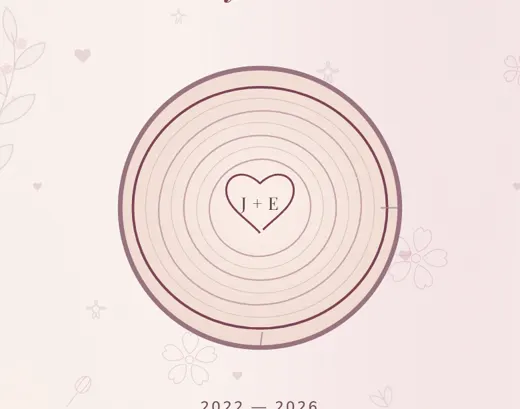
- Year ringseach of your years a ring, like a tree trunk, with a carved heart and your initials in the middle.
- Opening at midnighta countdown until your anniversary, then the page opens by itself in the first minute.
- Next anniversaryhow many days are left until the next one.
- Add to calendaryour anniversary as a reminder that repeats every year, for Google Calendar, Apple Calendar or Outlook.
- Tap the hearta little heart that counts every tap.
- Closing scenetwo swans, a swing or a love lock with your initials at the end of the page; you choose it in the editing screen.
- Seven themesfrom Dusty Rose to Candlelight, each one changes the envelope and the page together.
- Your citya drawing of your city or country under the envelope and on the page.
- Photos and musicup to 20 photos and a track from our music library.
- Secret note and lock questiona second message hidden behind a button, and a question only the two of you can answer.
Anniversary website ideas: what to write and what to add
Make the page a few days early and choose “open at midnight”: you send the link in advance, and it opens in the first minute of your anniversary.
- Enter the start date to the day. If the counter starts on the wrong date, they will be the first to notice.
- Write one sentence for each year: the flat you moved into, your first trip, the hard stretch you got through together.
- Mention something from this year in the letter. General romantic lines look the same every year.
- For a first anniversary: the counter and one honest letter are enough; the years will fill in by themselves.
- Use the secret note. A second message found at the end of the page is an ending they don't expect.
Celebrating a wedding anniversary? See wedding anniversary wishes for wording.
An anniversary card or an anniversary website: which one fits you?
A card and a page do different jobs, and they go well together. Here is the honest comparison.
| What matters | A card or a long message | This anniversary page |
|---|---|---|
| The time together | You work it out once and write it down | Counted live, to the second, every time it opens |
| Your years | A few lines or a photo collage | A line and a photo for each year, plus year rings |
| When it arrives | When you hand it over or press send | By link; at midnight on your anniversary if you like |
| Far apart | Needs the post, or stays a chat message | Opens on their phone wherever they are |
| Next year | A new card | Edit the same page for a year; the reminder repeats |
| Cost | The price of a card, or free | Free to create and preview; one payment to publish |
So is it a free anniversary website? Creating and previewing are free here. Publishing costs €9 once – no subscription – and the page stays online for a year, until your next anniversary. If you are together that evening, hand over the card too: after publishing you can print a gift card with a QR code that opens the page.
How to send the anniversary link, and how long it stays online
When you publish, you get one link. Send it on WhatsApp, iMessage or Instagram, or by text; when they tap it, the page opens on their phone. They don't need an app or an account.
You can create and preview without paying: your draft is kept for 7 days and only you can see it. When you publish, you pay €9 once and the page stays online for a year at the same link. The first time it is opened you get an email – so you know the surprise has arrived.
Would you rather hand it over? After publishing you will find a gift card with a QR code in the editing screen. Print it and slip it in with the flowers or the present; scanning the code opens your page.
Frequently asked questions
Is the anniversary website free?
- Creating and previewing are free. Publishing costs €9 once, including VAT, with no subscription, and the page stays online for a year – until your next anniversary.
Do I need to know how to code?
- No. You fill in a form and the page is built for a phone screen. There is nothing to download, host or design.
Does it work for a wedding anniversary too?
- Yes. Choose “Our wedding anniversary”: the page then counts your years of marriage and, for the well-known years, names the traditional anniversary, such as paper, wood or silver.
Can the page open exactly at midnight on our anniversary?
- Yes. Once you enter the date you can choose to open at midnight: until then the page shows a countdown, and it opens by itself in the first minute of your anniversary. You can send the link early.
What if I don't know the exact start date?
- The date is required, because the whole counter is worked out from it. If you can't remember the exact day, an approximate date works too.
Is the counter really live?
- Yes, it updates every second. As long as the page is open, the numbers keep moving.
Can my partner see the page before I publish it?
- No. Your draft stays private for 7 days and only you see it in the preview. The link only opens once you publish.
Can I still change the page after publishing?
- Yes, as often as you like for a year. The link stays the same and changes show up straight away. Only the names are locked 24 hours after publishing.
Who else can see our anniversary page?
- Only people who have the link. The page does not appear in search engines, and you can add a lock question that only the two of you can answer.
Does my partner need to install an app?
- No. The page opens in the browser, on a phone just as on a computer.
Is LoveyDear available in other languages?
- Yes: in English, German and Turkish. The fixed texts on the page (buttons, labels) appear in the language of the site you create it on; your own words can be in any language. This page is also available in German and in Turkish; the Turkish site has its own prices in Turkish lira.